Windows Autopilot
Picture the scene: It’s Friday afternoon, and a hiring manager urgently requests a new employee to be setup and ready by Monday morning. Normally, there’s a notice period to prepare—but this time, the employee is joining immediately to fill a critical gap.
Cue the panic. Accounts need creating. Devices must be shipped, built, and configured. Applications installed. It’s a logistical headache with barely any time to breathe.
Let me introduce, what I chalk up to magic or witchcraft: Windows Autopilot.
Instead of scrambling to get everything ready in a matter of hours, Autopilot lets you order a laptop directly from your procurement provider and ship it straight to the user. Once they log in, the device automatically configures itself—installing role-specific applications, connecting to Wi-Fi, applying VPN settings, and enforcing security policies.
No more waiting 3–5 days for an IT engineer to manually build and deploy the device. Autopilot streamlines the entire process, reducing onboarding time & improving the user experience. And the best news is, it’s also included in Business Premium licensing which most companies already have.
Autopilot
When you deploy a new Windows device, Autopilot takes advantage of the version of Windows that’s already preinstalled by the manufacturer. That means you don’t need to mess around with custom images or drivers for every model—no more re-imaging from scratch.
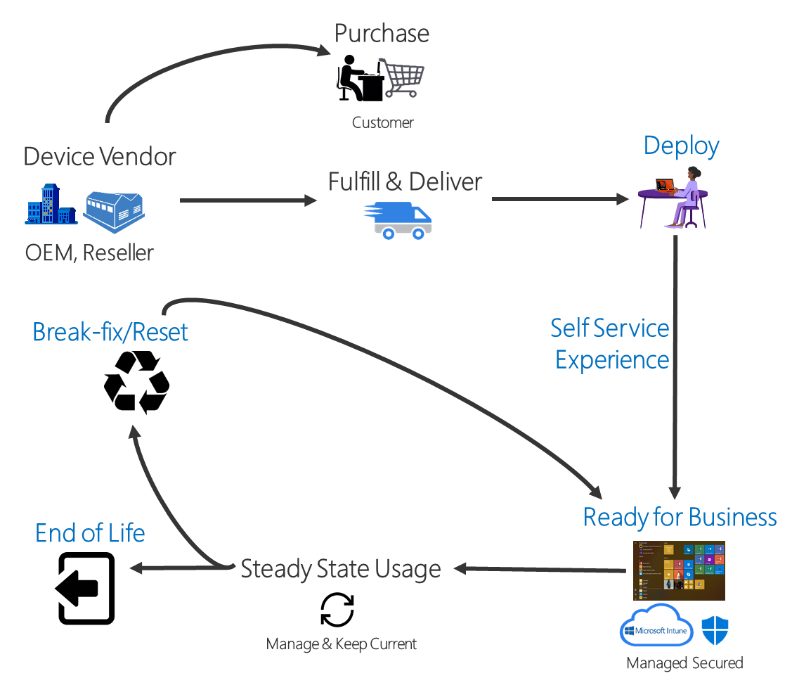
Instead, Autopilot transforms that fresh-out-the-box device into a fully configured, business-ready machine. It applies the right settings and policies, installs the apps your team needs, and can even upgrade the Windows edition—for example, moving from Windows Pro to Enterprise to unlock advanced features.
Once the device is up and running, it’s easy to manage using tools like:
- Microsoft Intune
- Windows Update policies
- Microsoft Configuration Manager
It’s a smarter, faster way to get devices into the hands of your users—without the usual IT bottlenecks.
Security and Compliance
Windows Autopilot doesn’t just streamline setup—it strengthens your security posture at the same time.
From the moment a device is powered on, Autopilot ensures it’s enrolled into your organisation’s security policies. That means:
- Automatic identity verification through Entra ID
- Role-based access controls applied from day one
- Mandatory compliance policies enforced before the user can access corporate data
- Built-in encryption and endpoint protection activated during setup
Whether you’re onboarding a remote employee or refreshing hardware across departments, every device arrives locked down and compliant.
And because Autopilot integrates with tools like Microsoft Intune, Defender for Endpoint, and Conditional Access, you get full visibility and control over every device, no matter where it’s deployed.
Common Misconceptions
Despite how powerful Autopilot is, there are still a few myths floating around that stop businesses from taking full advantage. Let’s clear those up:
“You still need to reimage every device.”
Nope. Autopilot uses the OEM-installed version of Windows, so there’s no need to wipe and reload a custom image.
“It’s only for big enterprises.”
Not true. Autopilot scales whether you’re deploying 5 devices or 500. Small and mid-sized businesses benefit just as much, especially when working with remote teams or rapid onboarding.
“It’s too complicated to set up.”
It’s actually designed to simplify things. Once your profiles are configured in Intune, Autopilot does the heavy lifting. And if you’re working with an MSP (like us), we’ll handle the setup and management for you.
“You lose control over device configuration.”
Quite the opposite. Autopilot ensures every device is configured consistently, securely, and in line with your business policies.
“It’s just for laptops.”
Autopilot works across a range of Windows devices, including desktops, tablets, and 2-in-1s. If it runs Windows and supports modern management, it’s fair game.
Ready to learn more?
Windows Autopilot is a game-changer for modern IT. From reducing setup times to tightening security and reducing costs, it transforms how businesses onboard and manage devices.
Whether you’re scaling up, supporting remote teams, or just tired of waiting for device builds or replacements, Autopilot delivers a smarter, faster, and more secure way to get devices into the hands of your users.
As your MSP partner, we’re here to help you make the switch.
We’ll handle the setup, guide you through best practices, and ensure your Autopilot deployment is tailored to your business needs.